Data and BI
How much does Microsoft Fabric cost? Pricing and licensing explained
.jpg)
If you’re evaluating Microsoft Fabric for your organization, you’re probably asking the same question as most decision-makers: how much does it actually cost?
Microsoft Fabric moves away from Power BI’s traditional per-user pricing model and uses a capacity-based approach instead. This guide is for IT leaders, controllers, and managers who need to budget for a data project. It covers Fabric capacity tiers, the Power BI licences you may still need, the important F64 threshold, and some of the costs that are easy to overlook.
Note: All prices in this article are indicative list prices in US dollars (USD) for a US region, as of the publication of this article in June 2026. Microsoft calculates its prices in USD and converts them based on the monthly exchange rate, and pricing varies by region. See the section on Canadian dollars below, and always confirm current pricing on the official Microsoft Fabric pricing page.
How Microsoft Fabric pricing works
Fabric is not priced per user. It is priced by capacity.
You purchase a pool of computing power measured in Capacity Units (CUs), and your entire organization draws from that shared pool. A single capacity can support all of the platform’s workloads, including Power BI, data ingestion with Data Factory, Spark notebooks, data warehousing, real-time analytics, data science, and Copilot.
Instead of paying for each service separately, they are brought together under a single capacity model.
You size your capacity based on your needs, and your teams share access to it. The larger the capacity, the more simultaneous workloads it can handle while maintaining shorter processing times.
Fabric capacities are offered as F SKUs, with each tier doubling the number of Capacity Units: F2, F4, F8, and so on, up to F2048.
Microsoft Fabric capacity pricing, from F2 to F64
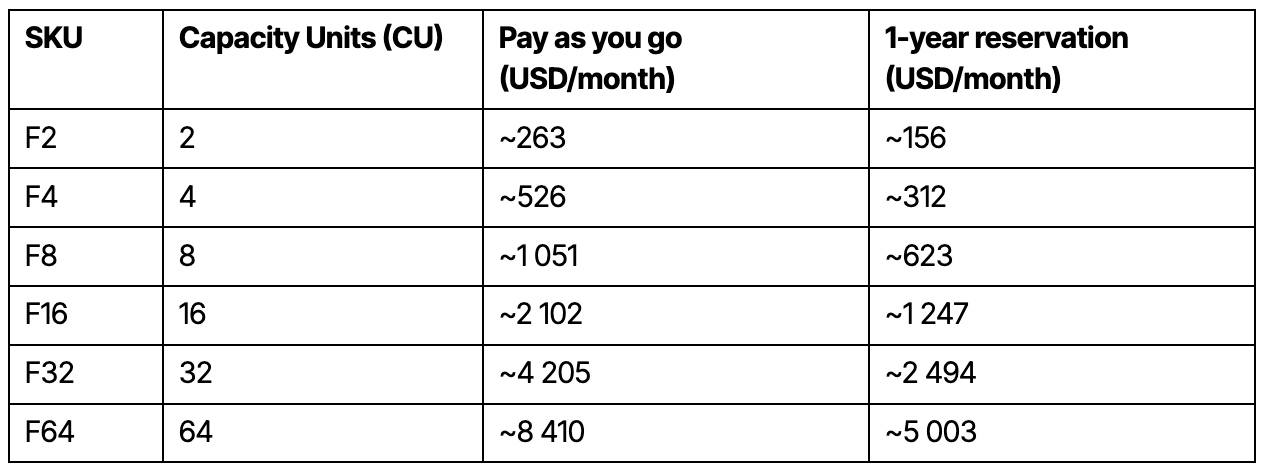
The following are some of the most common tiers for small and mid-sized organizations, along with approximate monthly costs for the two main purchasing options.
Pay-as-you-go pricing is approximately USD 0.18 per Capacity Unit per hour, while a one-year reservation can reduce costs by approximately 41%, according to Microsoft’s official pricing page.
Indicative prices in USD for a US region as of the publication of this article. Capacity tiers continue to double beyond F64, with F128, F256, and additional tiers up to F2048.
The two purchasing models serve different needs:
- Pay as you go: Scale capacity up or down as needed and pause it completely when it is not in use, with no long-term commitment. This can be a good option for workloads that do not run continuously, such as systems used only during business hours.
- Reserved capacity for one or three years: Commit to a capacity level in exchange for savings of approximately 41%. This can become worthwhile when your capacity needs to run more than 60% of the time.
Before launching an initiative, there is also a useful way to assess how much capacity you actually need. Fabric offers a 60-day free trial with F64-level capacity, allowing organizations to evaluate the platform’s workloads before committing to a purchase.
Power BI licences in Microsoft Fabric
Capacity pricing does not eliminate every per-user licence.
To publish and consume Power BI content, user licences are still required in many situations. Microsoft increased these prices on April 1, 2025, and they remain in effect in 2026.
USD list prices as of the publication of this article.
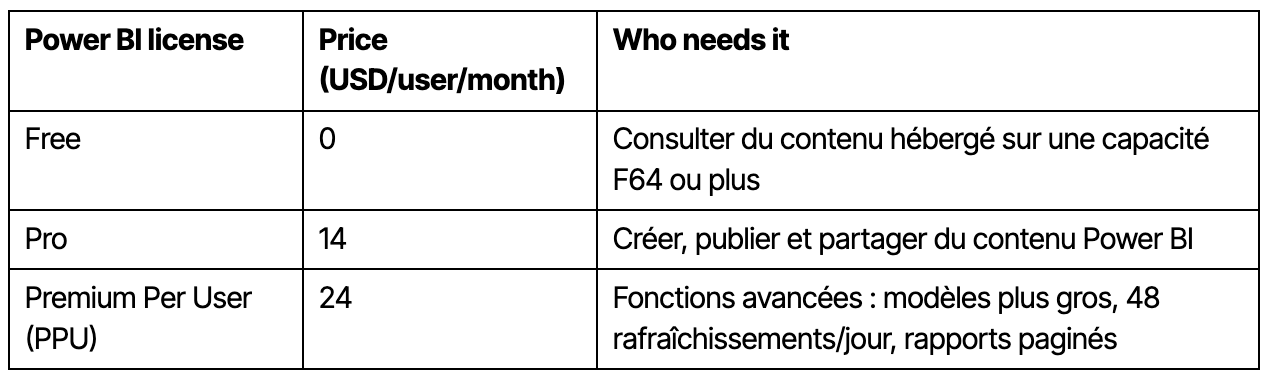
The key rule to remember is that Power BI content creators still need a Pro or PPU licence regardless of the size of your Fabric capacity.
For viewers, the rule changes at F64. Below F64, both viewers and creators need an individual Power BI licence. At F64 and above, viewers can access Power BI content using a Free licence, while creators still require Pro or PPU.
This distinction is one of the most common licensing surprises after deployment.
The F64 threshold: the number that matters most
F64 can significantly change the economics of your deployment.
Below F64, everyone who views a Power BI report needs a Pro or PPU licence. Starting at F64, report viewers can use a Free licence.
For an organization with hundreds of report consumers, that threshold can have a major impact on the overall cost of its analytics infrastructure.
As a reference point, an F64 capacity reserved at approximately USD 5,003 per month costs roughly the same as 358 Power BI Pro licences at USD 14 per user. Once you reach that number of viewers, F64 may become more cost-effective than paying for individual licences.
The comparison is not limited to licensing costs. An F64 capacity also supports data storage, transformation, and other Fabric workloads, which can help organizations build a broader and more sustainable analytics foundation.
Microsoft also stopped selling legacy Power BI Premium capacity SKUs from the P family to new customers as of July 1, 2024. Fabric F SKUs are now the starting point, and F64 is the functional equivalent of the former P1 capacity.
For the official licensing details, see Microsoft’s Fabric licensing documentation.
OneLake storage and other costs to consider
Compute is not the only cost to account for.
OneLake storage is billed separately at approximately USD 0.023 per GB per month, or around USD 23 per TB.
There is one important exception: each Fabric capacity includes free mirrored storage equal to its number of Capacity Units in terabytes. An F64 capacity therefore includes 64 TB of mirrored storage, while an F2 includes 2 TB.
If your mirrored data stays within that allowance, there is no additional charge for that storage.
Two practices can help keep costs under control:
- Avoid overprovisioning. Paying for an F64 capacity and using only 10% of it means paying for resources you do not need. A better approach is to size for your typical workload and use Fabric’s elasticity to handle peaks.
- Pause idle capacity. With pay-as-you-go pricing, pausing a capacity outside business hours can directly reduce your bill.
How much does Microsoft Fabric really cost? Three scenarios
The right SKU depends on both your number of users and your workloads. Here are a few useful starting points.
- Situation: Small team with fewer than 50 report viewers, basic report sharing, and no need for data storage or transformation processes. Starting point: Power BI Pro licences per user. Fabric may not be necessary.
- Situation: Building a data platform with Spark or data warehouse workloads. Starting point: F2 to F8, combined with PPU licences for creators
- Situation: Several hundred internal report viewers. Starting point: F64 or higher, allowing viewers to use Free licences
Consider an organization with 50 report viewers using a small Fabric capacity. Its costs will largely come from Power BI Pro licences: 50 × USD 14 = USD 700 per month.
As the same organization grows to several hundred viewers, moving to F64 may become more attractive because individual licences are no longer required for report consumers.
The exact break-even point will depend on Fabric capacity pricing in your region.
Choosing the right capacity without paying for what you do not need
The most common mistake is not misunderstanding the pricing table. It is choosing a capacity that is too large and paying for Capacity Units that rarely get used.
Sizing Fabric properly means understanding your actual workloads, how many creators and viewers you have, and how those needs are likely to grow.
That is exactly the work we do with our clients: clarify the need, select the right SKU, and build a data foundation that can support the organization over time.
Want to explore what that could look like for your organization? Learn more about how our team supports data and analytics projects, and explore our client work for concrete examples.
It is also worth putting reporting tools in place to monitor your Fabric usage over time. Microsoft provides several options, and for more specific needs, Osedea has developed custom analytics tools that provide greater visibility into capacity usage and costs.
In summary
Microsoft Fabric is priced by capacity rather than by user, with F SKUs ranging from F2 to F2048.
Power BI Pro or PPU licences are still required for content creators, while the F64 threshold allows report viewers to use Free licences. Storage and other usage-based costs should also be included in your overall budget.
The prices in this article are intended as reference points as of its publication date. Always confirm current pricing for your region and currency.
To understand what Microsoft Fabric would actually cost for your organization, without overprovisioning or underestimating your needs, talk to an Osedea expert.


Did this article start to give you some ideas? We’d love to work with you! Get in touch and let’s discover what we can do together.
Further Reading